Bot for OTClient · actively developed

Botting,
without the noise.

ZorbitBot lives inside your OTClient — Healbot, Cavebot, TargetBot, Shooter, Alarms, Conditions and a full Lua API, with full vBot script support.

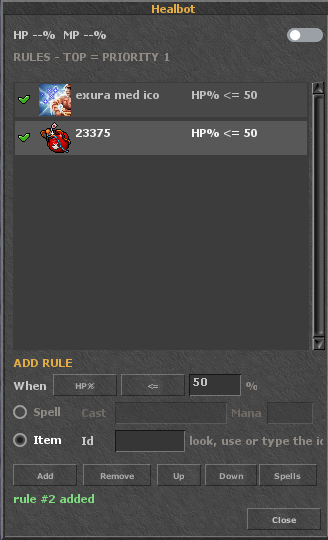
Healbot
Healbot
Healbotscreenshot coming soon
OTS only — ZorbitBot is built for servers running OTClient-based clients.
No CipSoft support — we do not support bot abuse on official (CipSoft) servers.
Before buying — check the Servers section whether your server is supported.
Modules

Everything you expect from a bot. And a bit more.

Each module is its own Tibia-styled window with dedicated settings and persistent profiles. Toggle anything with one click from the dashboard bar.

The heart of the bot

Healbot

An HP/MP rule list with full control over order — the first matching rule wins. Spells and potions in one place.

  • Priority per right-click — reorder rules up/down from a context menu
  • Potions always ready — used through the ammo slot, even with a closed backpack
  • Auto mana — spell mana cost read from the client's spell database
Combat

TargetBot & Shooter

Automatic target selection with priority by name, per-target attack settings and a fast rune/spell shooter — fully synced with the cavebot.

Cavebot & waypoints

A route made of node / stand / say / goto / delay points, a Lua functions editor with ready-made actions — including automatic imbuing with server-side verification — and live route state.

Friend Healer

A separate module for healing party members and friends on your whitelist — HP/MP rules for other characters, running alongside your own Healbot.

Conditions

Extra reactions to in-game situations — each condition has its own switch, threshold and option, stored per profile and consistent with alarms.

Scripts + open Lua API

An editor and console in the Scripts window. Drop .lua files into Documents\ZorbitBot\scripts\, run them with one click — and use the whole documented API. vBot scripts are fully supported too.

A launcher that does it all

ZorbitBotLauncher.exe detects the client, logs you in as usual and injects the bot with one click. It copies nothing into the game folder — after closing the client everything stays clean.

Supported servers

Works with OTClient forks

ZorbitBot is built for OTClient-based clients. Compatibility is verified per server — here is the current list.

Before you buy — check here whether the server you want to play on is supported. ZorbitBot works only with OTS running OTClient-based clients; we do not support bot abuse on CipSoft (official) servers.
● Fully supported

IglaOTS

The flagship: verified builds, dedicated testing and officially allowed automation. The recommended way to start.

verified builds OTClient Windows x64
On request

OTClient forks

The engine targets the OTClient family. Running a different fork? Ping us on Discord — new servers are added all the time.

For scripters

An API built for makers

Dozens of Lua functions to control the bot, read character state and build your own automations — plus the full game interface of your client, documented end to end.

  • Character state — zorbitGetPos / zorbitLog / zorbitGetSpectators
  • Healbot & Friend Healer — zorbitAddRule / zorbitFHSet
  • Cavebot & loot — zorbitAddWaypoint / zorbitAddLootId
  • Alarms & conditions — zorbitAlarmSet / zorbitCondSet
  • Custom windows — zorbitKit for Tibia-styled UI

Open the API documentation

Documents\ZorbitBot\scripts\my_script.lua
-- sample ZorbitBot script
local x, y, z = zorbitGetPos()
zorbitLog("Standing at " .. x .. "," .. y .. "," .. z)

-- low HP alarm with a 50% threshold
zorbitAlarmSet("hp", 1, 50)

-- healbot rule: strong healing below 70% HP
zorbitAddRule("heal", 0, 70, "exura gran mas res", 1000)

-- add a cavebot waypoint at your current position
zorbitAddWaypoint("stand", x, y, z)

Ready to hunt smarter?

Create a free account, activate a license key and see why this is the last bot you'll ever set up.

Download

One file. Three steps.

The whole bot in one package: engine, UI, 26 alarm sounds and 116 textures embedded in the library. There is no installation — unzip and run.

Windows x64 OTClient client Zero dependencies
Unzip the package anywhere on your disk.
Run ZorbitBotLauncher.exe — it detects your OTClient by itself and shows the login screen.
Log in as usual — the bot injects at game start and the ZorbitBot module bar appears in the UI.
FAQ

Frequently asked questions

Does ZorbitBot work on official CipSoft servers? +
No. ZorbitBot is built for OTS running OTClient-based clients, and we do not support bot abuse on CipSoft (official) servers. Before buying, check the Servers section whether your server is supported.
Is botting allowed on the supported servers? +
On the servers listed under Supported servers — yes, explicitly. Each server sets its own rules; ZorbitBot is built for communities that welcome automation, so always check your server's stance.
What exactly do I get after downloading? +
Two files: ZorbitBotLauncher.exe (launcher with a built-in injector and login screen) and ZorbitBot.dll (the whole bot — engine, UI, styles, icons and sounds embedded inside). No installers, no dependencies.
How do I start the bot? +
Run the launcher, pick the client and log in as usual — the DLL injects itself. In game you'll see the ZorbitBot module bar; each button opens its own window (Healbot, Alarms, Cavebot…).
Can I write my own scripts? +
Yes. Drop .lua files into Documents\ZorbitBot\scripts\ and they appear in the Scripts window with a console. You get the documented API — see the API documentation page.
Where are my settings stored? +
In profiles saved automatically (including settings.txt in your user data folder). Profiles, healbot rules, waypoints and alarms survive client restarts.
Which clients are supported? +
ZorbitBot is built for OTClient-based clients on Windows x64. The UI imports the client's styles 1:1, so it looks native on every fork we verify — see Supported servers.